

Role:
Primary designer
Team
UX researcher, PM, Dev
Timeline:
2025 - 2026
100%
concept understanding
in early testing (n=6)
87%
workflow completion
in benchmark testing (n=8)
2 to 1
experiences merged via
progressive disclosure


CONTEXT
The platform already had the power. Business users just couldn't reach it.
IBM webMethods Hybrid Integration already let technical specialists build powerful automations. Business users like Danielle knew exactly what they wanted to automate, onboarding an employee, routing a lead, approving a request, but turning that into a working workflow still meant going through someone else. AI created an opportunity to close that gap.

How might we let business users create enterprise-grade automations without requiring integration expertise, while maintaining the reliability and trust an enterprise platform depends on?
DESIGN DECISIONS

01.
One experience, not two
Early in the project, Danielle was going to get her own sandboxed view within webMethods Integration: scoped to creating automations through chat, with her own My Automations and Team Automations spaces, no rest of the platform in the way. That changed when IBM Think came up and the team needed something ready to show, so building a separate sandbox on that timeline wasn't realistic, and Launchpad still needed to scale to more capabilities beyond integration.
At first, losing that sandbox felt risky. It hadn't just simplified navigation, it created confidence by making it obvious where to start and what mattered. The real challenge became preserving that simplicity once the dedicated environment disappeared. What stayed exactly the same was the chat experience itself, the same flow, Business View, preview, and testing already concept-tested, so the workflow itself never asked more of Danielle than it had before.

02.
Give every audience its own lens on the same workflow
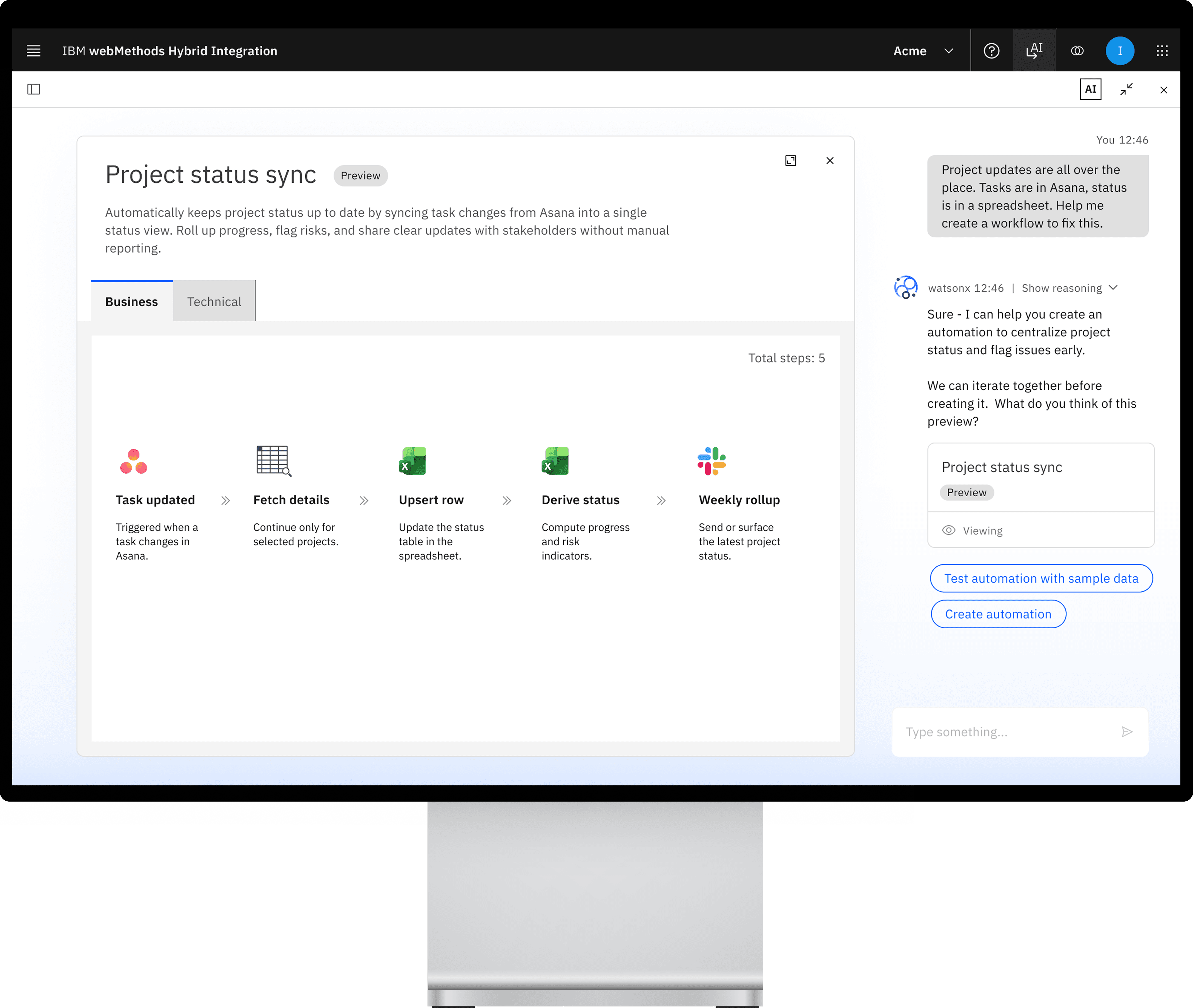
Business users wanted plain explanations. Technical users wanted to see the real thing: the actual connectors and mappings, exactly as they'd appear in the manual builder, testable against sample data. Rather than pick one, I designed dual representations of the same underlying workflow: Business View for process and alignment, Technical View for the real technical flow and validation.
"It breaks down automation into business and technical perspectives, making it easier to understand and document."
Business user, usability session

03.
Build confidence before anything goes live.
Generating a workflow got easy. Trusting it enough to activate against production systems didn't. I added a preview stage so users could confirm the AI understood their intent before anything was built, and a testing stage where sample data could be run through a workflow to verify behavior before it went live. While it's still a draft, someone can even edit a mapping conversationally, right there in chat, since nothing is live yet to break.
BEYOND ONE WORKFLOW
The AI's designed behavior became the basis for a platform-wide framework
Workflow creation was the first use case, but the real foundation was the design work behind how the AI and chat experience actually behaved. That work became the basis for what's now the One Integration AI Experience Framework, a shared vision and set of experience principles meant to hold up across every AI-powered product on the platform, not just Launchpad.

Conversation by default
Chat is always the way back in
Search existing APIs and reusable assets before creating something new.

Progressive disclosure
Business summary first, depth on demand
Never lead with schema or technical detail. Let people drill in only when they want to.

Don't replicate UI
Chat guides, it doesn't rebuild the product
When deep configuration is needed, link out to the right tool instead of recreating it in conversation.

Guide and grow
Proactively surface the next step
Translate technical concepts into business language and help people build capability over time.
The role is shifting my contribution from designing a single experience to shaping how a whole organization approaches AI interaction, evaluating where the Launchpad model holds up, where it needs to flex, and helping other designers apply it with the same rigor rather than copy it wholesale.
13 designers
OUTCOMES
Because we couldn't measure adoption yet, I helped define how we would
Launchpad was still in private preview, so production usage data wasn't available yet. Rather than waiting until launch to figure out what "working" meant, I partnered with Product and Engineering to map the full user journey and define exactly what we'd instrument at each stage, from opening the chat to returning weeks later.

REFLECTION
Confidence came from clarity, not containment
Losing Danielle's dedicated sandbox risked losing that confidence too. It didn't, because the chat experience itself, not the space around it, was doing the work of orienting her. Now, when scope gets cut, I ask first whether people still know where to start, not just what access they lost. That's the real test this project passed: good interaction design can replace the guardrails a dedicated space used to provide.
NEXT CASE STUDY
API Agent
Explore the case study →